Subnets
A subnet is an address range inside a VPC, and it's what a machine's network interface actually attaches to. Every subnet is bound to a security group, which decides what its machines accept.
Prerequisites
- Any role can view subnets: anyone who can see the VPC can see what's inside it
- The Tenant Operator, Tenant Manager or Tenant Administrator role, acting in the chosen group, to add a subnet, rename it, change its security group, or remove it — see Roles & Permissions. An organization-wide role acts in the Default group only; a Tenant Operator scoped to a group acts in that group.
- An Active VPC to put it in
View subnets
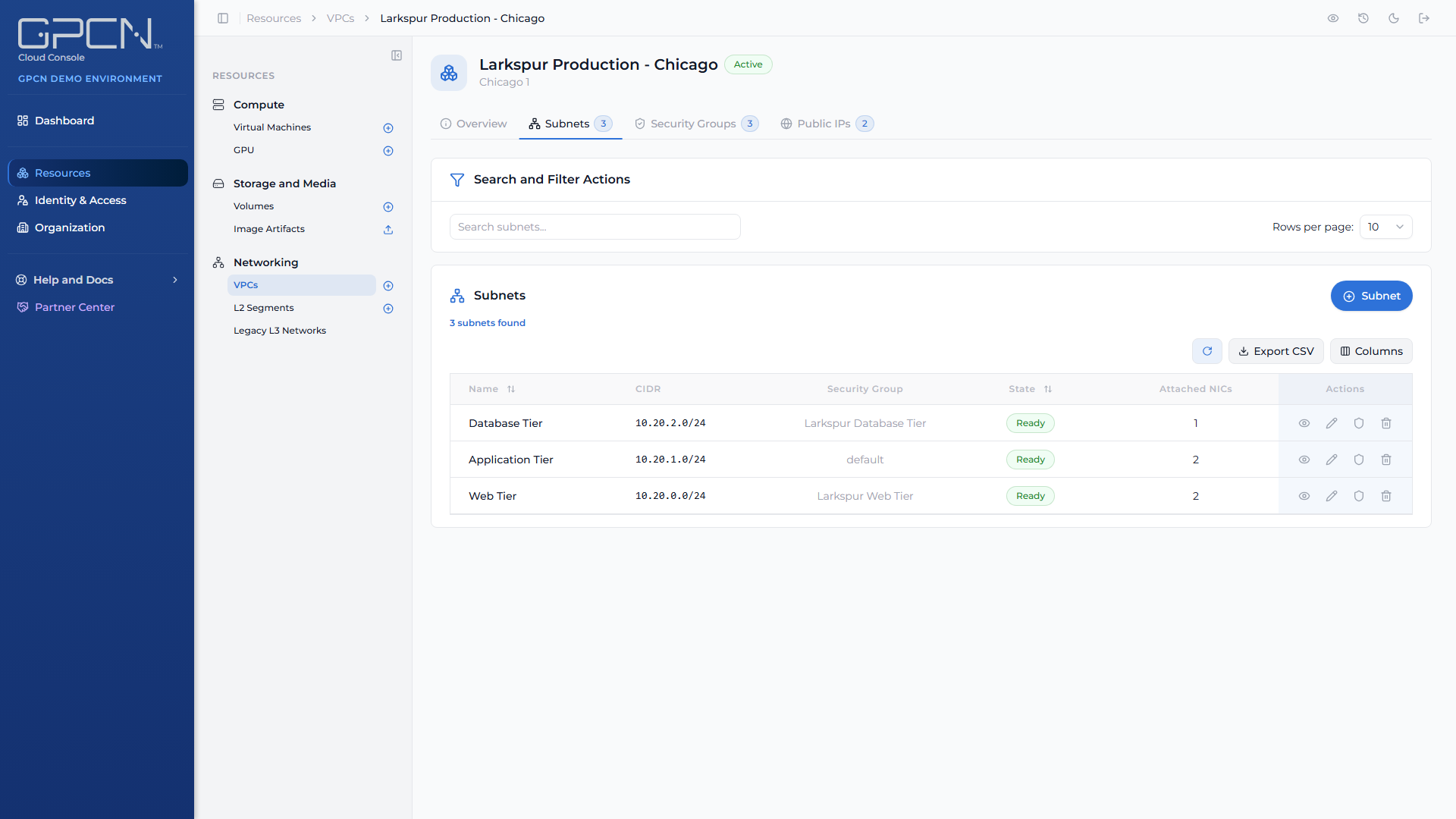
Open a VPC from Resources → Networking → VPCs and choose the Subnets tab. Each row shows the subnet's address range, the security group it's bound to, and its state.
Click View on any row for a drill-down that includes the machines currently attached.
Add a subnet
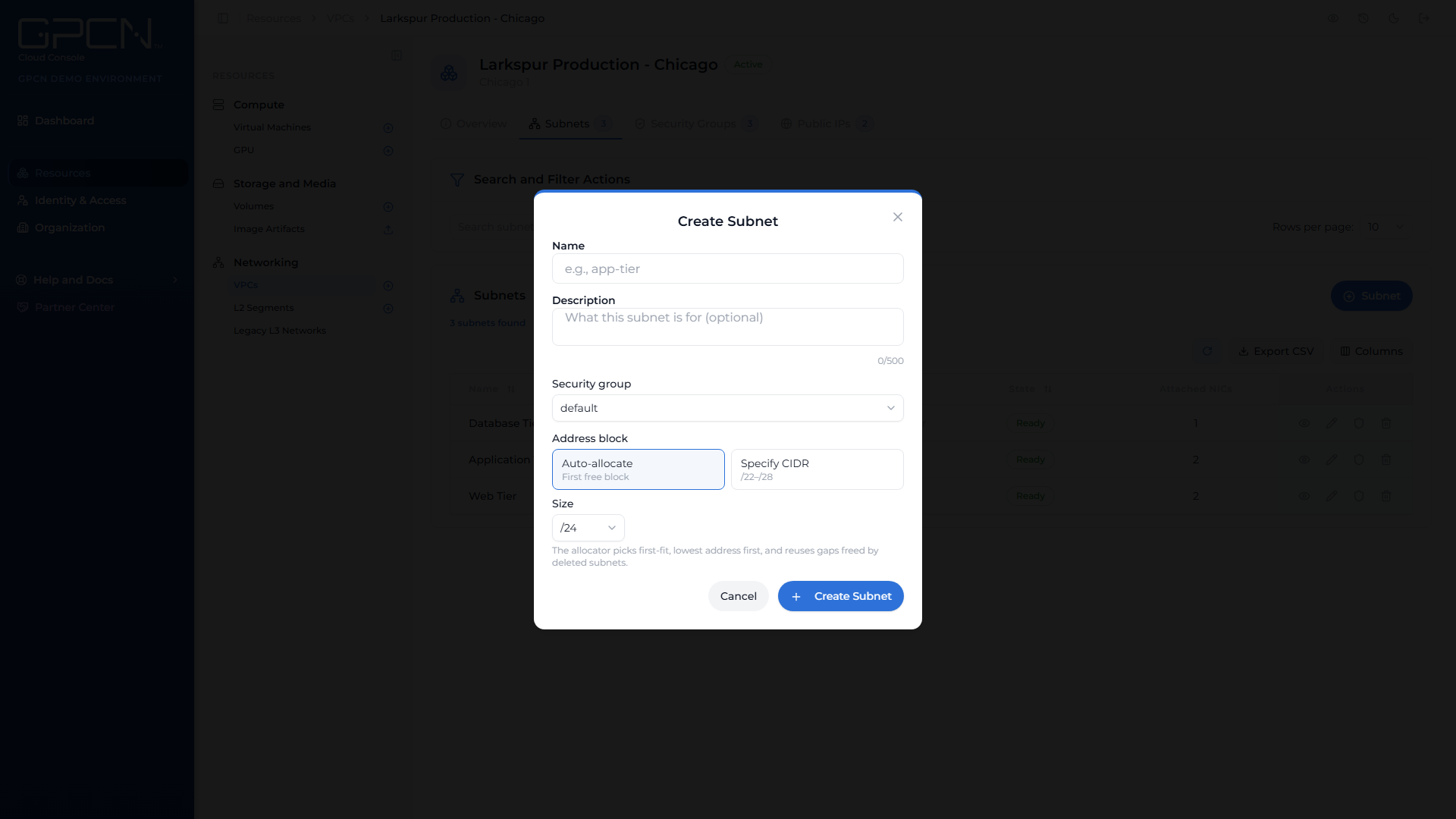
- On the VPC's Subnets tab, start a new subnet.
- Give it a name, and a description if you want one.
- Pick the security group it should be bound to. The VPC's default group is available, along with any you've created.
- Choose the address block — see below.
- Submit.
The subnet doesn't ask you for a data center — it inherits the VPC's.
Letting GPCN™ choose the block
Auto-allocate is the easier path and the one to use unless you have a reason not to. You choose a size and the platform finds the space.
Sizes run from /22, a block of 1,024 addresses, down to /28, a block of 16. The default is /24, which is 256. A few addresses in every subnet are reserved for the network itself, so the usable count is a little lower than the block size.
The allocator takes the first free block at the lowest address, and reuses gaps left by subnets you've deleted.
Choosing the range yourself
Specify CIDR lets you type the range, like 10.50.1.0/24. Two rules apply:
- It has to sit inside the VPC's parent CIDR. The form shows you that range underneath the field, so you don't have to go and look it up.
- It has to be between /22 and /28 — the same sizes auto-allocation offers.
Specify the range when something outside GPCN™ needs to know it in advance — a firewall rule, a VPN policy, a partner's allow-list. Otherwise let auto-allocate keep the VPC tidy for you.
Subnet states
Creating and deleting a subnet are asynchronous jobs, so a subnet carries a state while the platform works on it.
| State | What it means |
|---|---|
| Creating | Being built. You can still select it in the Create VM wizard — deployment waits until it's ready. |
| Ready | Usable. Machines can attach. |
| Failed | Couldn't be created. Delete it and add another. |
| Removing | Being torn down. |
If a subnet sits in Removing and stops making progress, the row keeps its state and shows the reason the platform recorded. Press delete again to retry — the platform accepts the retry immediately, and the confirmation repeats the recorded reason so you can see what happened.
Change a subnet's security group
You can move a subnet to a different security group without rebuilding it. This is how you change what every machine on that subnet accepts, in one step.
Rebinding takes effect for every machine on the subnet. If the new group's rules are tighter, traffic those machines currently accept will start being dropped.
Delete a subnet
A subnet can only be deleted once nothing is attached to it. Detach or delete the machines using it first, then delete the subnet.
Attaching machines
A machine reaches a subnet in one of two ways:
- At creation — the Create VM wizard's networking step asks for a VPC and a subnet, and it's a required step.
- Afterwards — add a network interface to an existing machine and choose the VPC subnet.
There are two rules worth knowing before you plan a layout:
One interface per subnet. A machine can't take two interfaces on the same subnet — each interface must name a different network, subnet or segment.
One VPC per machine. A machine attached to a VPC subnet is only offered other subnets in that same VPC, so plan a machine's subnets inside one VPC rather than across two.
Next Steps
- Security Groups → — the rules bound to each subnet
- Elastic IPs → — make a machine on a subnet reachable
- Network Interfaces → — attaching and detaching on an existing machine
- VPCs → — how subnets fit into the VPC
.png)