Create a VPC
A VPC gives you a private network in one GPCN™ (Global Private Cloud Network™) data center. Creating one also creates its default security group, so it's ready for a subnet straight away.
Prerequisites
- The
vpcfeature enabled for your organization — check Organization → Account → Features - The Tenant Operator, Tenant Manager or Tenant Administrator role, acting in the chosen group — see Roles & Permissions. An organization-wide role acts in the Default group only; a Tenant Operator scoped to a group acts in that group. Tenant Viewer is read-only.
- A data center that supports VPCs. Only those appear in the form, so you can't pick one that would be refused.
Create a VPC
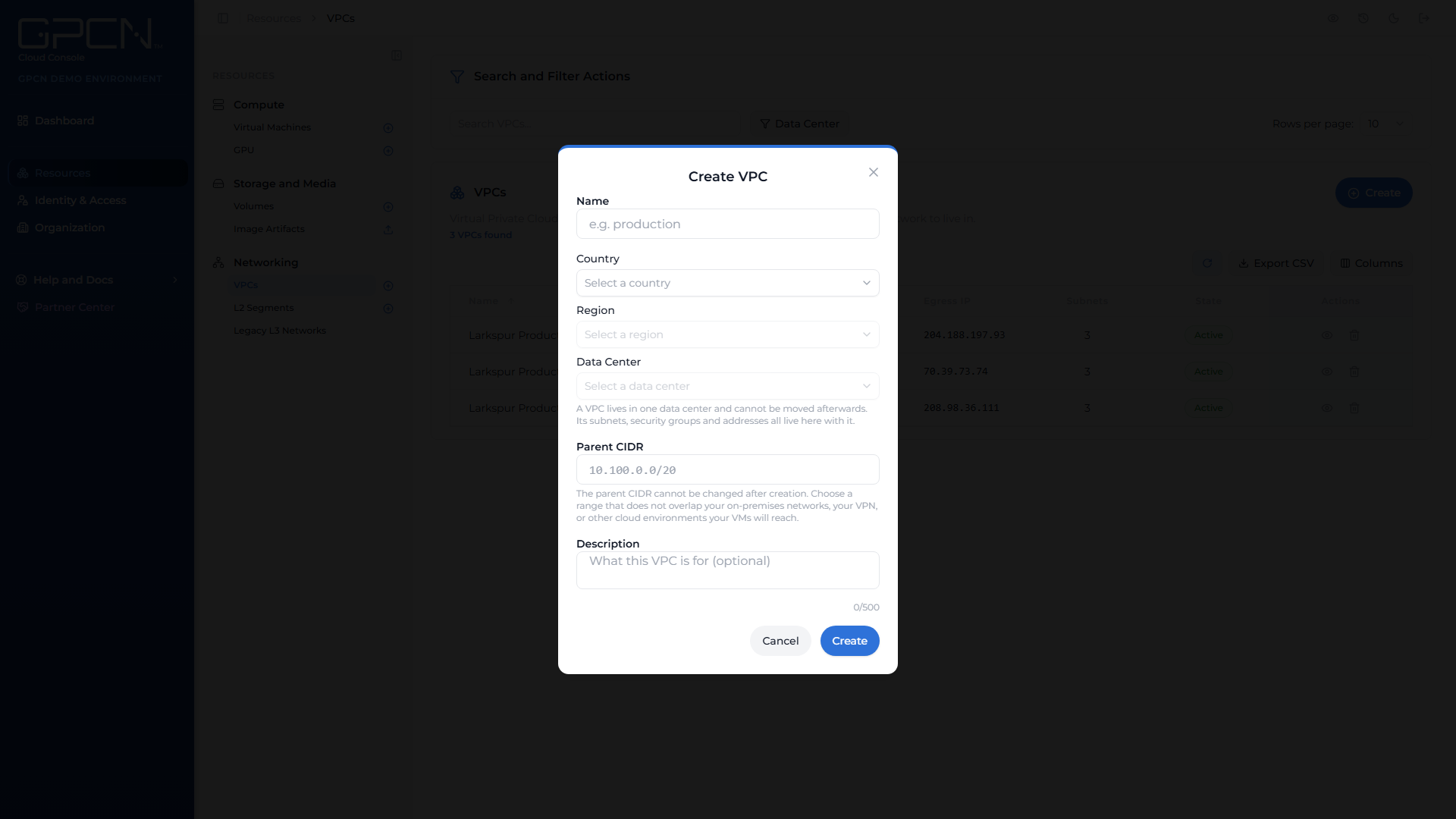
- Go to Resources → Networking → VPCs and click Create.
- Resource Group — every VPC must belong to a resource group, which controls who can see and manage it. Nothing is preselected, so the field opens with: "Every VPC must belong to a resource group. Choose one, or type a new name to create one." The picker only lists resource groups you have permission to create VPCs in. Search for an existing one, or type a name that doesn't match anything yet and choose Create "
" to make a new group on the spot, without leaving the dialog. If your role doesn't let you create resource groups, you won't see the create option — pick from the groups you already have access to. "Subnets, security groups and public IPs in this VPC inherit its resource group." - Enter a name.
- Choose the location: Country → Region → Data Center.
- Enter the Parent CIDR — the address range the whole VPC owns. This is required.
- Add a description if you want one.
- Click the create button to submit.
The data center is fixed at creation and can't be changed afterwards. Every subnet, security group and address in the VPC lives there with it. If you need private networking somewhere else, create a second VPC there.
Choosing the parent CIDR
The parent CIDR is the block every subnet in this VPC is carved out of, so it decides how many subnets you can have and how large each one can be.
Four rules are checked as you type:
| Rule | What's accepted |
|---|---|
| A valid IPv4 range | In CIDR form, like 10.100.0.0/20 |
| Size between /16 and /24 | Anything wider or narrower is refused |
| A private range | 10/8, 172.16/12 or 192.168/16 |
| Written at its network address | 10.100.0.0/20, not 10.100.0.5/20. If you're a few addresses off, the form suggests the corrected range |
A /20 is a good starting point, which is why it's the example in the field. Subnets are between /22 and /28, so a /20 parent holds four /22s or sixteen /24s — room for a few tiers with space to grow.
The parent CIDR can't be changed after creation, so pick a range that doesn't overlap anything your machines will need to reach: your on-premises networks, your VPN, or other cloud environments.
If the range overlaps another VPC
If your range overlaps a VPC your organization already has, the form stops and shows you which ones, with Create anyway and Go Back.
Creating it is allowed. The reason to think twice is that VPCs with overlapping ranges can never be connected to each other — so if these two might ever need to reach each other privately, go back and choose a different range.
You may also be told that a number of overlapping VPCs sit outside the resource groups you can see. They're counted but not named.
What happens next
Creating a VPC is an asynchronous job, not an instant result. The portal hands the job to the task drawer, and the VPC appears in the list with a state of Creating while the platform builds it and its default security group.
| State | What it means |
|---|---|
| Creating | Being built. Nothing can attach yet. |
| Active | Ready — you can add subnets. |
| Failed | Creation didn't complete. The row keeps the reason the platform gave. |
| Deleting | Being torn down. |
A Failed VPC isn't retried in place. Delete it and create a new one — the platform allows that straight away.
Creating a VPC while you build a machine
You don't have to come here first. The Create VM wizard's networking step can create a VPC, and a subnet inside it, without leaving the wizard.
That's usually the faster path for your first machine. Deployment waits until the subnet reports Ready, so you can create it and keep going.
Next steps after creating
A VPC on its own carries no machines. To make it useful:
- Add a subnet — a slice of the parent CIDR, and what your machines actually attach to. See Subnets →.
- Review the default security group — it filters everything on that subnet. See Security Groups →.
- Acquire an address if machines need to be reachable from the internet. See Elastic IPs →.
Next Steps
- Subnets → — add the address ranges machines attach to
- Security Groups → — control what your machines accept
- VPCs → — states, tabs and what you can change later
- Create a VM → — deploy a machine into your new subnet
.png)