Security Groups
A security group is the packet filter applied to every machine on a subnet. Each VPC is created with a default group, and every subnet is bound to exactly one group at a time.
Prerequisites
- Any role can view security groups and their rules
- The Tenant Operator, Tenant Manager or Tenant Administrator role, acting in the chosen group, to add a group, rename it, change its rules, or remove it. An organization-wide role acts in the Default group only; a Tenant Operator scoped to a group acts in that group.
A subnet always filters, so a machine accepts nothing its group does not allow — whatever its guest operating system is willing to listen on. If a service is unreachable, the group's rules are the first place to look.
View groups and rules
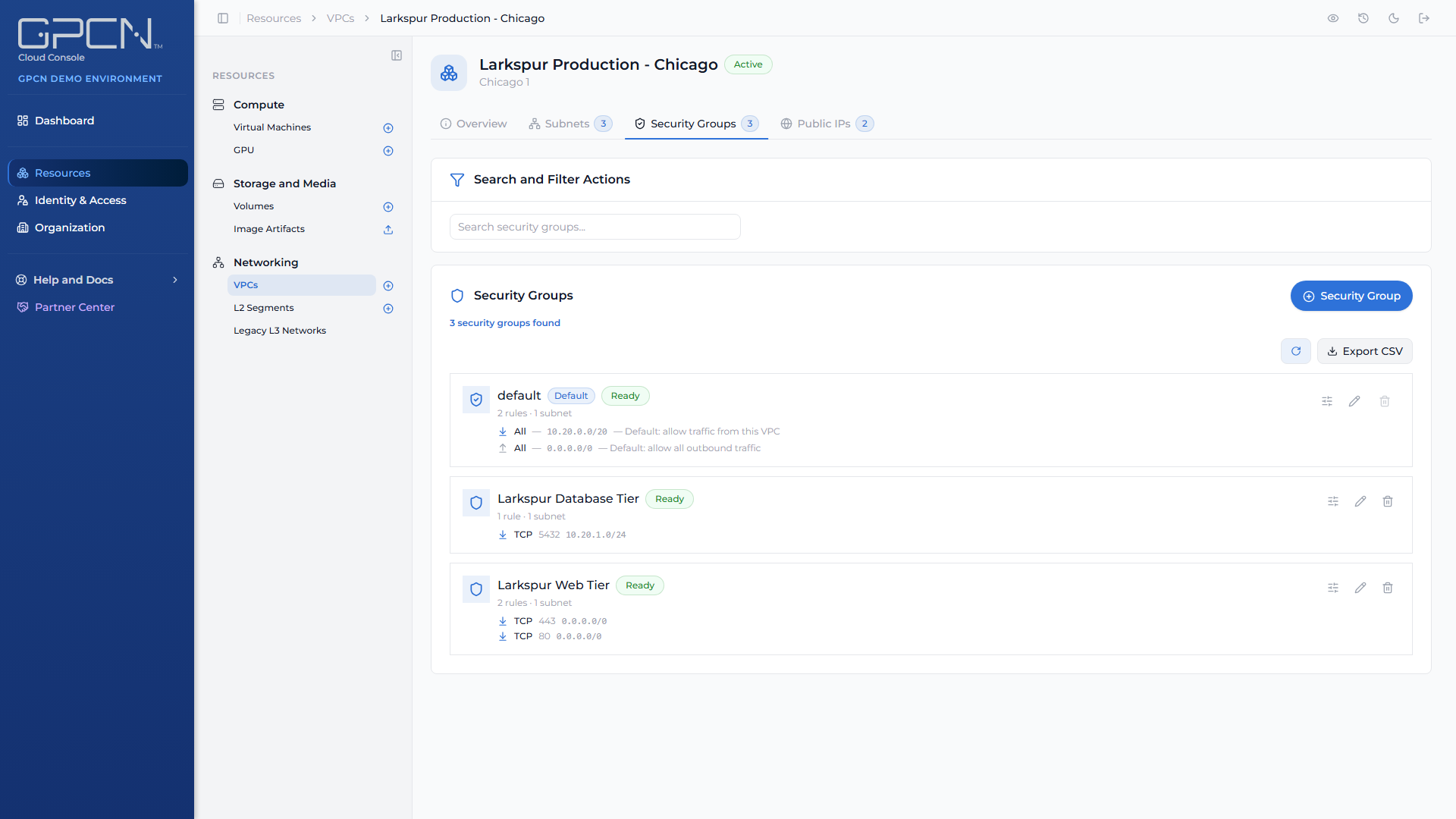
Open a VPC from Resources → Networking → VPCs and choose the Security Groups tab. Each group lists its rules.
Rules are shown in a fixed order rather than alphabetically — ingress before egress, and within each direction tcp, udp, icmp, then all — so the same group always reads the same way.
The default group
Every VPC gets a default security group when it's created, and it can't be deleted. That's deliberate: it guarantees no subnet is ever left without a filter.
You can rename it and change its rules like any other group. If you'd rather keep it pristine, create your own group and rebind your subnets to it — see Subnets →.
How a rule is written
Open a group's rules with the sliders control on its row. It reads Edit rules if your role can change them and View rules if it can't.
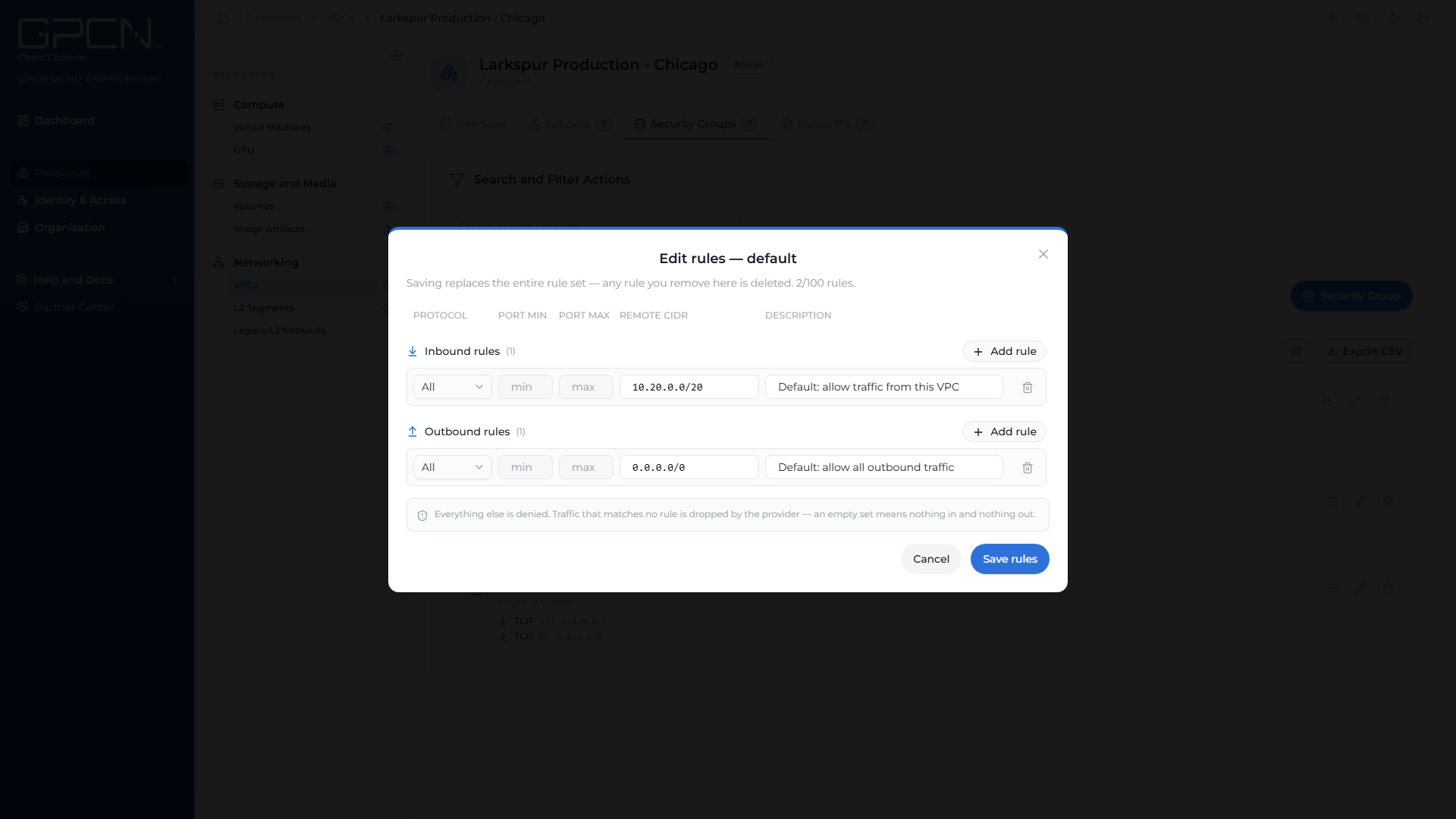
The dialog splits the group into Inbound rules and Outbound rules, each with its own Add rule control, so a rule's direction is the section you add it to rather than a field you fill in. A group holds up to 100 rules across both directions, and the dialog shows the running count.
Each rule has these parts:
| Field | Values |
|---|---|
| Direction | Inbound or outbound — set by the section the rule sits in |
| Protocol | tcp, udp, icmp, or all |
| Port range | A start and end port between 1 and 65535 |
| Remote CIDR | The address range the rule applies to |
| Description | Optional, up to 255 characters |
Three rules about ports, all enforced when you save:
- Ports apply to
tcpandudponly. Setting them onicmporallis rejected. - If you set one end of the range you must set the other — both or neither.
- The start port can't be higher than the end port.
Changing rules replaces the whole set
This is the part that surprises people. When you save a group's rules, you're replacing the entire rule set, not appending to it.
Any rule you don't include in the save is removed. Start from the group's current rules, make your change, and save the complete set — don't save just the rule you're adding.
The dialog says so at the top, above the rules: Saving replaces the entire rule set — any rule you remove here is deleted.
A rule's identity is its content, so saving the same rule twice changes nothing.
Add a group
- On the VPC's Security Groups tab, create a group and give it a name.
- Add its rules.
- Bind a subnet to it from the Subnets tab.
A new group affects nothing until a subnet is bound to it.
Delete a group
A group can only be deleted if no subnet is bound to it, and the VPC's default group can never be deleted. Rebind any subnets to another group first.
If a delete stalls, the row keeps its state and shows the reason the platform recorded. Press delete again to retry — the confirmation quotes that reason back to you.
Next Steps
- Subnets → — bind a subnet to a group, or move it to another
- Elastic IPs → — inbound reachability still needs a rule to allow it
- Networking → — the networking surfaces and what each is for
- Roles and Permissions → — which roles can change a group's rules
.png)